host

Load balancing is an option in this version of XIKP.
Host List: selecting this will cause a list of the current availble machines for your net if you have one. If you haven't you should create one..
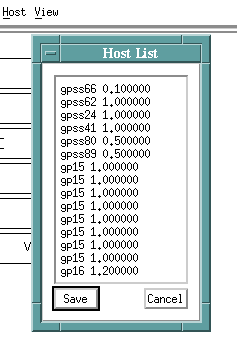
This list resides in your home directory in a file called .ikp_host (should be marked readable by everyone just like your .rhosts file). Using the Host List menu you can add to the list (by left clicking at the end of a line and typing in the new machine name and its performance rating) or you can delete from the list (by left clicking at the end of the line to be deleted and then backspacing over the line).
The performance ratings are currently rather arbitrary with a sparc10 given a weight of 1.0 and a sparc2 a weight of 0.5. In general the higher the number the more powerful the machine.
Note that in the example shown one of the machines (a sparc10) was given a weight of 0.1. This was the local machine with the responsibility for serving up the data and pre-processing it before the data enters the parallel or remote machine portion of the net. Therefore this local machine should be discouraged from being included in the parallel nodes.The auto-load balancing feature is turned on in XIKP by placing a * in the Remote Host entry of the process menu panel header as shown:
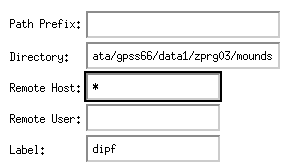
This should be done for processes in the parallel arms of the net that you intended to run on the remote machines. When the net is ultimately run the remote machines listed in the .ikp_host file are checked for loads over the last 15 minutes, 5 minutes, and 1 minute. A simple equation combines these three numbers to arrive at an average load for all these machines. This load number is then divided by the performance rating to give a weighted load. The higher the load for a particular machine the less likely that machine will be included in the net.
