Header
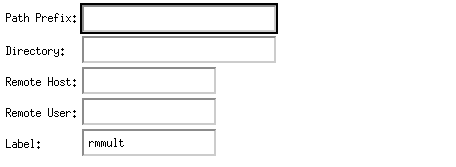
Path Prefix: this is if more than one version of the program (in this case rmmult) exists. If the user for instance has a bootleg copy in his home directory he would enter the full path to that copy, e.g. /home/gpsa/zprg03/bin/sun4. In most cases this will be left blank and the version used will be the default phase2 one. If the text moves out of view you can use your arrow keys to move forward or back in this area or use the mouse to left click at the beginning or end of the text straing.
Directory: this is the directory the program will "see" when it runs and where it will dump its printout files. If the process is run on the users local machine the default here will be the directory in which XIKP was started. If running this process on a remote machine the full path back to the directory of choice must be entered. For printout files the user might wish to create a Printout directory under his home root. This has a better chance of being "seen" by a process running on a remote machine than a directory on a local disk that may not be NFS cross-mounted. For remote processes this must be filled out. If the text moves out of view you can use your arrow keys to move forward or back in this area or use the mouse to left click at the beginning or end of the text straing.
Remote Host: this is the remote machine you want this process to run on, e.g. obupsw6. If left blank the process will run locally. If a * is placed here the auto-load balancing feature will be turned on.
Remote User: the user may put another user ID here but generally for Amoco networks this can be left blank which will run the process under your user ID.
Label: any informative string with blanks can be entered here. All or part of it will appear on the process box. The default here is the current process name.
