Process
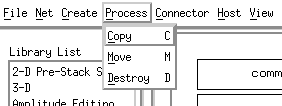
Provides means for manipulating process boxes once they are in the draw area.
Copy: you can either select this on the Process popup or simple hit the "C" key. A copy symbol will appear prompting the user to left click in the interior of the box to be copied. An "angle iron" will position the upper left corner of the copied box and another left click causes it to be drawn.
Move: you can either select this on the Process popup or simple hit the "M" key. A crosshair will appear. Position the crosshair in the interior of the box to be moved and hold down the left mouse button. You can then move the mouse and the box will move around the draw area. Releasing the mouse button "drops" the box.
Destroy: you can either select this on the Process popup or simple hit the "D" key. A skull & crossbones will appear. Left clicking in the interior of the box to be destroyed will cause a popup prompt asking if you really want to do this. If you confirm, the box is blown away.
